 11
11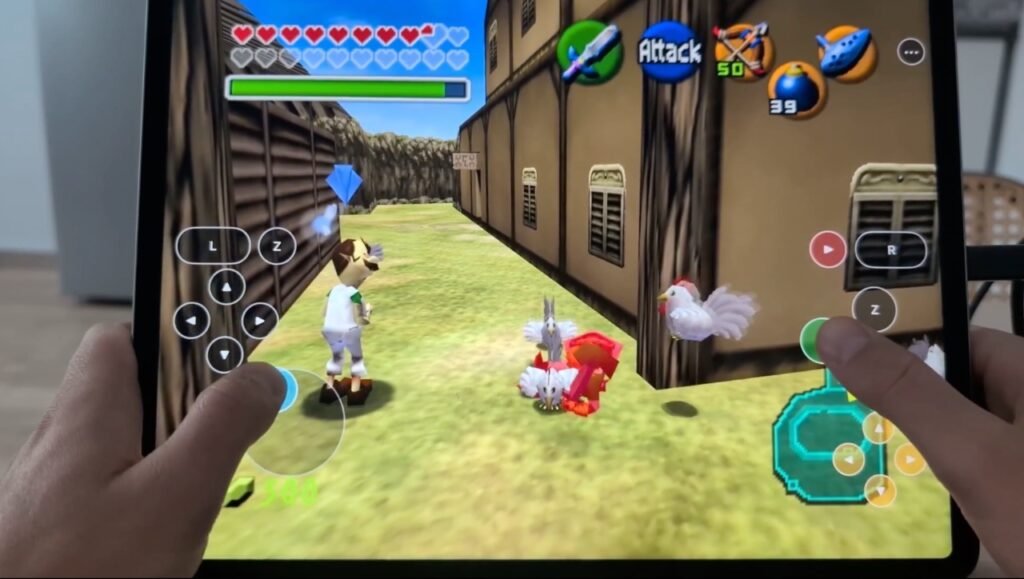
TL;DR: A developer has ported the classic Nintendo 64 game The Legend of Zelda: Ocarina of Time to run natively on iOS and iPadOS. That means it’s not an emulator — it’s a real app built specifically for Apple devices, running at 60fps with widescreen support and modern controls.
Developer Kahris (known as @chrissotraidis on X) has successfully brought The Legend of Zelda: Ocarina of Time to iPhone and iPad as a native application.
This isn’t like those emulator apps you might have heard about. Instead of pretending to be a Nintendo 64, this version was completely rebuilt from the ground up to run directly on Apple’s chips.
Important Point: This Is NOT an Emulator!
- Emulators pretend to be old hardware (like an N64) and translate game code on the fly. This can be slow and buggy.
- Native ports take the game’s original code, translate it into a language modern devices understand (like C), and compile it into a brand-new app made just for your iPhone or iPad.
- Think of it like translating a book into a new language vs. reading the original book through a translator every time you turn a page.
Here’s what makes this port special:
Important Legal Note
This project does not include the game assets (models, textures, sounds, levels). You must own a legal copy of the original N64 ROM to generate the required files. The port only provides the engine — not the game data itself.
To play, you’ll need:
| Feature | Original N64 | This iOS Port |
|---|---|---|
| Frame Rate | 20 fps | 60 fps |
| Resolution | 240p | Full Retina / 4K |
| Aspect Ratio | 4:3 | True Widescreen (16:9+) |
| Graphics API | Custom N64 microcode | Apple Metal |
| Controls | N64 Controller | Touch / Bluetooth / Keyboard / Mouse |
| Runs Via | Hardware / Emulator | Native ARM64 App |
This is a massive achievement for game preservation and homebrew development — bringing a beloved classic to modern hardware the right way.
No. This is a homebrew project. You’ll likely need to sideload it using tools like AltStore, Sideloadly, or a developer certificate. It’s not approved by Apple or Nintendo.
Not necessarily. Many sideloading methods work on stock iOS, though they may require refreshing the app every 7 days (free Apple ID) or yearly (paid developer account).
Not directly. You’d need to dump the ROM from your cartridge using special hardware (like a Retrode or N64 flashcart), then convert it using the Ship of Harkinian tools.
Yes! As long as it runs iOS/iPadOS (or macOS with Mac Catalyst support), and you can sideload the app, it should run — especially well on Apple Silicon devices.
The code is legal (reverse-engineered, not leaked). But you must own the game to legally use the ROM. Downloading a ROM you don’t own is copyright infringement.
Final Thought: This port shows what’s possible when passionate developers combine reverse engineering, modern APIs like Metal, and Apple’s powerful chips. It’s not just emulation — it’s Ocarina of Time, reborn for 2026 and beyond.
Source: Kahris on X (@chrissotraidis)