
Popular Posts

DeepSeek V4 Flash正式版震撼上线:AI能力全面跃升,速围观

DeepSeek V4 Flash正式版震撼上线:AI能力全面跃升,速围观

DeepSeek Launches V4-Flash: A Smarter AI Assistant for Developers

What Happened?

On July 31st, DeepSeek officially released the DeepSeek-V4-Flash API. Think of this as a major "brain upgrade" for their AI model, specifically designed to make it much better at acting like a helpful digital assistant (or "Agent") for programmers.

Important Point: This update is only for developers using the API right now. If you just use the DeepSeek app or website, nothing has changed for you yet!


Why Is This a Big Deal? (The "Report Card")

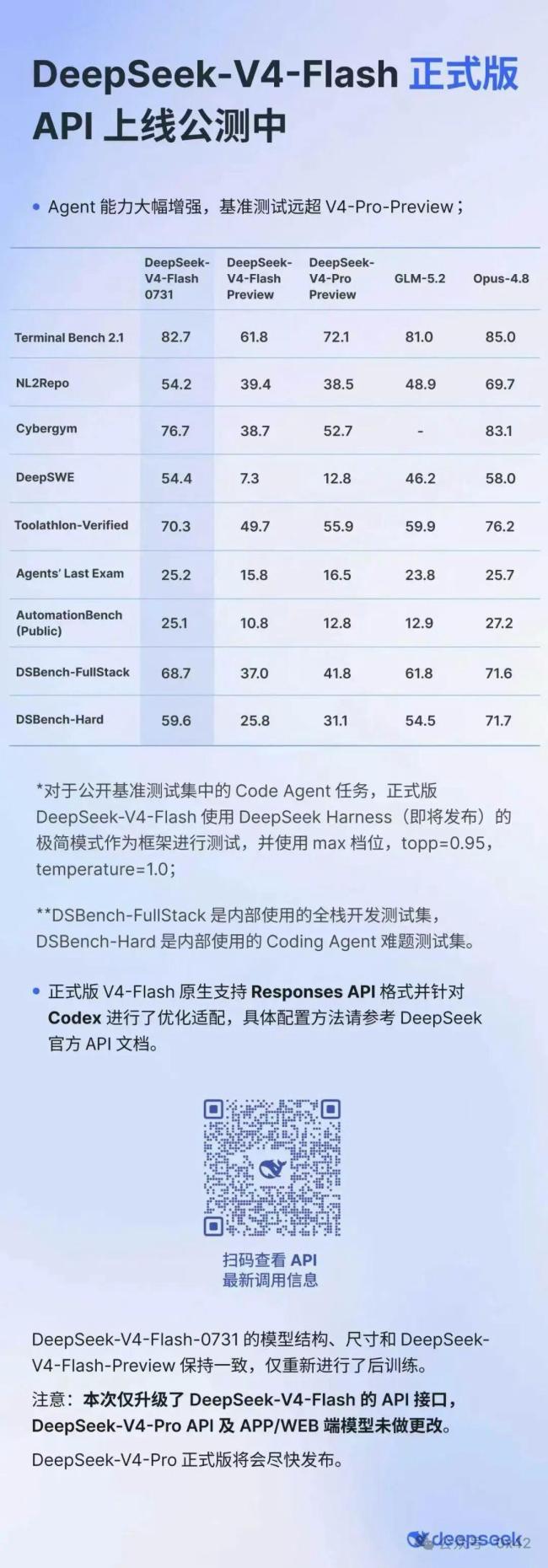
DeepSeek put V4-Flash through some really tough exams—benchmarks that test how well an AI can actually do stuff, not just answer questions. It passed with flying colors!

Here are the scores (higher is better):

Test Name What It Tests Score
Terminal Bench 2.1 Using a command line (like a real developer) 82.7
Cybergym Cybersecurity & system interaction tasks 76.7
Toolathlon Verified Using various tools correctly 70.3
DSBench-FullStack Building full-stack applications (Frontend + Backend) 68.7
DSBench-Hard Solving very difficult coding problems 59.6

What does this mean in plain English?

These scores prove V4-Flash isn’t just good at talking about code—it’s good at writing, debugging, and operating software like a skilled junior developer. It can use tools, navigate file systems, and complete complex projects more reliably than before.


The "Magic Feature": Works Inside Your Favorite Coding Tools

This is the part developers are most excited about. V4-Flash now natively supports the "Responses API" and is fully adapted to the Codex Ecosystem.

What is the Codex Ecosystem?

It’s a set of popular tools where developers write code:

  1. Codex CLI (Command Line Interface)
  2. ChatGPT Desktop App
  3. VS Code (via the Codex Plugin)

Why is "One-Time Configuration" awesome?

Important Point: You set it up once, and V4-Flash works inside all three environments instantly. No messy re-configuring every time you switch windows!

How Developers Can Use It (Numbered Steps)

  1. Get Access: Obtain the V4-Flash API key from DeepSeek.
  2. Configure Once: Add the key to your Codex settings (CLI, Desktop, or VS Code).
  3. Start Coding: Ask V4-Flash to:
    • Write new code features.
    • Find and fix bugs in existing projects.
    • Scaffold entire projects (set up folder structure, config files, boilerplate code).
    • Run terminal commands to test or deploy.

What About Everyone Else? (Non-Developers)

Callout: Don’t Panic!

  • DeepSeek App Users: No changes. Your chat experience stays the same.
  • Web Version Users: No changes.
  • V4-Pro API Users: This update does not apply to you yet.

The Waiting Game

  • V4-Flash: Has Codex superpowers right now.
  • V4-Pro: Expected to get Codex support in early August.
  • Future: When V4-Pro gets its full official release, regular users (App/Web) will likely see the benefits too.

Summary

  • DeepSeek-V4-Flash API launched July 31st.
  • Focus: Massive upgrade to Agent capabilities (doing tasks, using tools, coding).
  • Proof: Top scores on hard benchmarks (Terminal, Cybersecurity, Full-Stack Coding).
  • Killer Feature: Plug-and-play integration with Codex CLI, ChatGPT Desktop, & VS Code.
  • Current Scope: Developers only (API access). Regular apps unchanged.
  • Next Up: V4-Pro gets Codex access in early August; general user updates coming later.

FAQ (Frequently Asked Questions)

1. Can I use V4-Flash on the DeepSeek website or mobile app right now?

No. This release is strictly for the API (Application Programming Interface), meaning developers building their own tools. The consumer-facing App and Website are running on the previous versions for now.

2. I pay for DeepSeek Pro (V4-Pro). Do I get this update?

Not yet. The blog specifically states V4-Pro users must wait until early August for Codex integration. V4-Flash is a distinct, faster/cheaper model tier getting the feature first.

3. What is an "Agent" in AI terms?

Think of a standard AI as a librarian—you ask a question, it gives you an answer (a book). An Agent is like a personal assistant—you give it a goal ("Build me a login page"), and it takes actions: writes files, runs tests, fixes errors, and hands you the finished result.

4. Is V4-Flash better than V4-Pro?

They are different tools for different jobs.

  • V4-Flash: Optimized for speed, efficiency, and tool use (Agents). Great for coding automation.
  • V4-Pro: Usually implies a larger, "smarter" model for deep reasoning, complex analysis, or creative writing.
  • Analogy: V4-Flash is a speedy, handy craftsman; V4-Pro is a senior architect.

5. How do I start using V4-Flash in VS Code?

  1. Ensure you have the Codex extension installed in VS Code.
  2. Go to the Codex settings / configuration panel.
  3. Select DeepSeek V4-Flash as the model provider.
  4. Paste your DeepSeek API Key.
  5. Start chatting with the agent in your editor!

Leave a Reply

Your email address will not be published. Required fields are marked *